Continue CLI Integration
Use any model with Continue CLI through LLM Gateway. One config file, 210+ models, full cost tracking.
Continue is an open-source AI code assistant available as a CLI tool. By configuring it to use LLM Gateway, you get access to 210+ models from 60+ providers with unified cost tracking.
One config file. Any model. Full cost visibility.
Prerequisites
- An LLM Gateway API key — sign up free (no credit card required)
Setup

Get Your API Key
Sign up or log in to your LLM Gateway dashboard. Navigate to API Keys and create a new key. Copy it — it starts with llmgtwy_.
Create a Config File
Create the Continue config directory and config file:
mkdir -p ~/.continueThen create ~/.continue/config.yaml with your LLM Gateway configuration:
name: llmgateway
version: 0.0.1
models:
  - name: claude-sonnet-4-6
    provider: openai
    model: claude-sonnet-4-6
    apiBase: https://api.llmgateway.io/v1
    apiKey: llmgtwy_your-api-key-here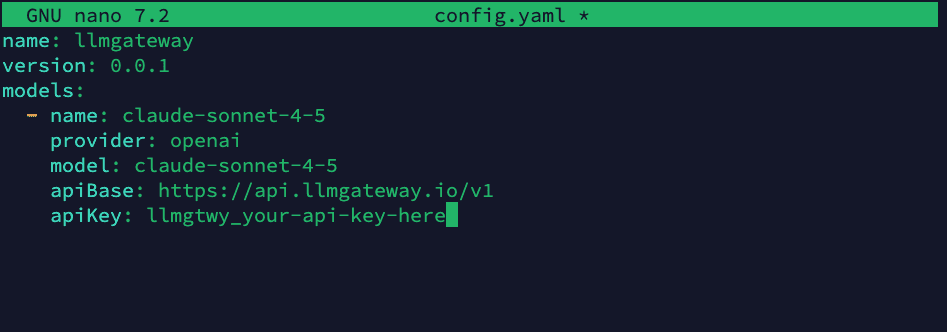
Replace llmgtwy_your-api-key-here with your actual API key from the
dashboard.
Add More Models (Optional)
Add as many models as you want from the models page:
name: llmgateway
version: 0.0.1
models:
  - name: claude-sonnet-4-6
    provider: openai
    model: claude-sonnet-4-6
    apiBase: https://api.llmgateway.io/v1
    apiKey: llmgtwy_your-api-key-here
  - name: gpt-5.5
    provider: openai
    model: gpt-5.5
    apiBase: https://api.llmgateway.io/v1
    apiKey: llmgtwy_your-api-key-here
  - name: gemini-3.1-pro
    provider: openai
    model: gemini-3.1-pro
    apiBase: https://api.llmgateway.io/v1
    apiKey: llmgtwy_your-api-key-here
All models use provider: openai since LLM Gateway exposes an OpenAI-compatible API.
Start Using Continue
Launch Continue CLI with the --config flag pointing to your config file:
cn --config ~/.continue/config.yaml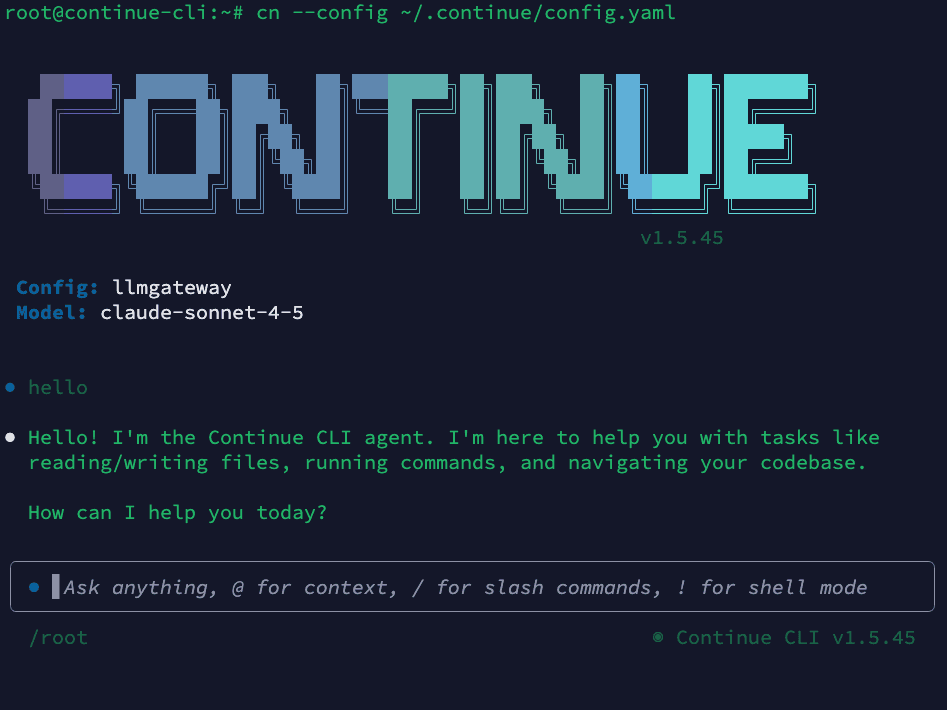
All requests now route through LLM Gateway. You'll see usage, costs, and logs in your dashboard.
Why Use LLM Gateway with Continue
- 210+ models — Claude, GPT, Gemini, Llama, DeepSeek, and more
- One API key — Stop managing separate keys for each provider
- Cost tracking — See exactly what each session costs in your dashboard
- Response caching — Repeated requests hit cache automatically
- Automatic fallback — If a provider is down, requests route to an alternative
- Volume discounts — Check discounted models for savings up to 90%
Configuration Details
Provider Setting
Always use provider: openai in your Continue config. LLM Gateway exposes an OpenAI-compatible API, so Continue's OpenAI provider handles all models correctly — including Claude, Gemini, and others.
Project-Specific Config
Place a .continue/config.yaml in your project root to override the global config for that project:
name: project-config
version: 0.0.1
models:
  - name: gpt-5.5
    provider: openai
    model: gpt-5.5
    apiBase: https://api.llmgateway.io/v1
    apiKey: llmgtwy_your-api-key-here
Using with the --config Flag
Point to any config file:
cn --config path/to/config.yamlSwitching Models
Add multiple models to your config and switch between them in the Continue interface. In the CLI, you can specify a model with the --model flag if supported, or update your config file.
Locking to a Specific Provider
By default, LLM Gateway automatically fails over to alternative providers if your chosen provider is experiencing downtime. To disable fallback, add a custom header:
models:
  - name: claude-sonnet-4-6
    provider: openai
    model: claude-sonnet-4-6
    apiBase: https://api.llmgateway.io/v1
    apiKey: llmgtwy_your-api-key-here
    requestOptions:
      headers:
        X-No-Fallback: "true"
Disabling fallback means requests will fail if the chosen provider is down. See the routing docs for details.
Troubleshooting
"Failed to parse config" error
Make sure your config file includes name and version fields at the top level:
name: llmgateway
version: 0.0.1
models:
  - ...
Onboarding wizard still appears
If running cn without --config shows an onboarding prompt, create the sentinel file to skip it:
touch ~/.continue/.onboarding_completeOr always launch with the --config flag to bypass onboarding entirely.
Model not found
Verify the model ID matches exactly what's listed on the models page. Model IDs are case-sensitive.
Connection timeout
Check that apiBase is set to https://api.llmgateway.io/v1 (note the /v1 at the end).
Authentication errors
Make sure your apiKey starts with llmgtwy_ and is valid. Check your dashboard to confirm the key is active.
Provider must be "openai"
LLM Gateway uses an OpenAI-compatible API. Even when using Claude or Gemini models, set provider: openai in your Continue config. The gateway handles routing to the correct upstream provider.
View all available models on the models page.
Need help? Join our Discord community for support and troubleshooting assistance.
How is this guide?
Last updated on